
AmazingHiring: Summer product updates
With OpenAI dominating our newsfeeds and industry trends, the necessity for a more automated sourcing process grows daily. AmazingHiring is bringing special summer updates to ensur…
Read more7439

According to the Stack Overflow “2020 Developer Survey”, 83% of developers are not actively looking for a job and thus, can be qualified as passive candidates. It is no secret that most technical candidates hardly ever update their resumes or even publish CVs on job-related websites. Given that 95% of recruiters globally use LinkedIn to source specialists, the question comes up: where and how to find more developers?
One of the ways to answer that question is an X-Ray search. Nowadays, having the skill to X-ray websites in the hunt for more qualified candidates has become an essential part of advanced sourcing expertise. And small wonder, this search, if built correctly, delivers highly targeted results and helps find the most relevant candidates.
In this article, we will focus on the art of X-Raying websites. Including LinkedIn and Github — the largest web-based hosting service for IT projects with more than 56 million users (as of September 2020).
X-Ray, or Boolean, search is a sourcing technique that allows to get highly relevant results by putting specific keywords together with so-called Boolean operators to the search bar of any search engine (e.g. Google, Bing, Yahoo).
Overall, it helps narrow down the search to a limited and yet, more targeted number of results and brings out candidates that suit the job best. Recruiters tend to use this method to quickly and easily locate candidates’ info from web sources that are indexed by this search engine with one Boolean string. These web sources should be publicly available and might include job boards, social and professional networks (such as LinkedIn, Facebook, Stack Overflow, etc), phone directories, and any other websites on the web.
WIth Google X-Ray search recruiters can find:
In order to X-ray Google, one should form a search query using Boolean operators to combine multiple search parameters. Main Boolean commands include the following operators:
Below you can find a descriptive table that explains how the main Boolean operators work and shows some examples of its usage.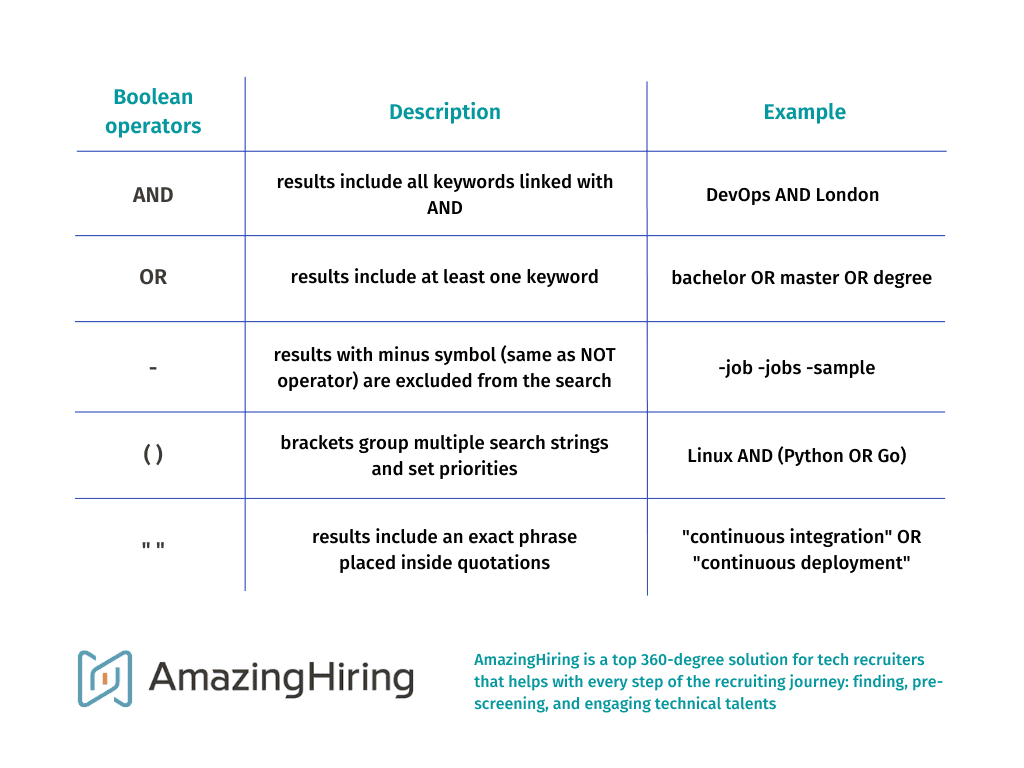
Even with the basic Boolean operators, you can easily upgrade your candidates’ web-sourcing from “Google Lite” version to “Google Pro”. However, if you want to find, for instance, candidates’ resumes or CVs, you might need to use advanced Boolean commands:
Thus, the Google X-Ray search string should consist of all the essential keywords for your project and Boolean symbols to deliver accurate results.
With Google X-Ray search capabilities you can sometimes find a list of people registered for some past online or offline event. For example, a professional development webinar, tech conference, or alumni meeting.
Attendee’s lists of such professional events can be of huge help for recruiters to identify potential candidates looking for upskilling, networking, or other new possibilities. Naturally, not all events publish the attendee list but it is an amazing chance to spot new talents and thus, worth a shot!
To X-ray Google for some relevant attendee lists, create an accurate Boolean search string including all necessary keywords. For instance, it can look like this:

(intitle:*.attendee.list OR inurl:*.attendee.list OR insubject:*.attendee.list) AWS
Of course, this query is very generic but it shows the principles of how to build your search to make Google show you some event’s list of attendees. If you want to x-ray some specific event, just add its name to the string. You can also mention keywords needed for the role you work on or add the operator filetype: (e.g. filetype:xls) to locate the documents with names and job titles.
With such lists, you can cross-reference attendees’ info to find their profiles on the web and learn more about their professional backgrounds. It is a piece of cake if you have AmazingHiring Chrome extension that indexes major networks, such as GitHub, Stack Overflow, Kaggle, Dribbble, Behance, LinkedIn, Facebook, Twitter, etc and allows you to easily get tech candidates’ social media profiles (free!).
Another way you can use an X-Ray search to find more candidates is to build a query for resume sourcing. Here is a sample command string that finds resumes of DevOps engineers from London:

(inurl:resume OR cv OR vitae) DevOps London (bachelor OR master OR degree) -job -jobs -sample -examples
How it works: this Boolean string detects all the CV files or resumes (the operator “inurl:” contains the words “resume”, “cv”, “vitae”) that belong to DevOps engineers (AND keyword “devops”) with a degree (AND either of the keywords “bachelor”, “master, “degree”). Due to the minus sign (-job -jobs -sample -examples), we exclude sample cv and resumes along with the job ads to eliminate irrelevant results.
As you can see from the screenshot above, Google shows us 115 thousand results satisfying the search query. Surely, some of the links there might not be precisely relevant, however, it is a head start.
Github is the world’s biggest web-based hosting service with more than 56 million users. It is a social coding site where developers can host their code, share it and work on open source collaboration projects.
Nowadays, Github has become more popular among tech recruiters. And no wonder, it is a “sourcer-friendly” website that expands the potential talent pool. It is due to the large number of tech professionals who are harder to find on LinkedIn or just rarely use it. The only trick is to source on Github effectively and again, that is where X-Ray search comes in.
To begin with, let us quickly run through what kind of data we can possibly find there. Github’s profile structure include:
You can start X-raying Github by typing site:github.com or site:github.io into your Google search bar. Then, add necessary keywords such as, for example, coding language, location, number of followers. To be exact, any other search parameter that might help you find relevant candidates.

site:github.com language:go location:london followers:5..10
Once you have followed a user’s Github link, you can open their profile. Do not forget to install our Chrome extension — it will help get more data on candidates while sourcing on social and professional networks in general and on Github specifically.

Google X-Ray Search also works for LinkedIn. Here is the sample string to find DevOps engineers from London which consists of just three keywords: job title, location, and website’s name.

“DevOps engineer” AND London site:linkedin.com/in
All told, having Google X-Ray search skills upgrades your sourcing dramatically. While most recruiters and sourcers live on LinkedIn and job boards, savvy hunters x-ray the web and get the best talents.
Yet, it has to be said that there is no such thing as a 100% accurate and precise search query. Even perfectly built Boolean strings can deliver some number of false-positive results which is why you should always double-check them.
Moreover, if you run your X-ray search on LinkedIn, you may sometimes spot profiles that do not actually fit the entered requirements. It is likely due to the “people also viewed” feature that suggests additional profiles and makes it more difficult to X-ray.
Luckily, Google X-Ray search can also be upgraded and turned into a powerful sourcing tool — AmazingHiring.
The platform’s search engine allows its users to source tech specialists across more than 80 different social and professional networks. Access millions of highly detailed candidates’ profiles with verified contact info and links, get smart recommendations of relevant professionals and build more diverse teams. The tool is also a top solution for pipeline management and candidate engagement.
So if you want to both simplify your sourcing and get state-of-the-art results, just .

(amazinghiring AND “best tech candidates” AND “easy sourcing” AND “great customer service” AND “team collaboration” AND “less time to hire”) NOT (“manual sourcing” OR “google x-ray”)
With OpenAI dominating our newsfeeds and industry trends, the necessity for a more automated sourcing process grows daily. AmazingHiring is bringing special summer updates to ensur…
Read more
This article is written by Eugeniia Filipovich, a Technical Recruiter, Trainer and Manager with more than 6 years of experience who helped scale some of the most robust global tech…
Read more
Technical recruitment is a dynamic industry, where needs and trends are constantly changing. AmazingHiring team has introduced new features to bring even more value to recruiters a…
Read more
Why use Twitter for sourcing? The global talent shortage has never been as dramatic as it has been in the last 16 years. New roles are especially difficult to fill when it comes to…
Read moreContact us at sales@amazinghiring.com